
Chapter 4 · 4.2
Adding an extra domain
Do you want a second website in the same hosting package, with its own domain name and email addresses? Then you add an extra domain. This is only possible if your package has room for more domains. You can see how many under Domains next to the counter (see Viewing the domains in your package).
The easiest way: via My WebOké
If your domain is with WebOké, the quickest way to link it to your package is in My WebOké, under My Products and then Domains per package. We'll then set up the domain correctly in DirectAdmin straight away, including the DNS and email. You can read how this works in Can I also do this in My WebOké? Domains per package and Forwarders.
Adding a domain in DirectAdmin
You can also create a domain yourself in DirectAdmin. This is useful if the domain is registered with another provider.
- In DirectAdmin, press Ctrl + J (on a Mac Cmd + J) and type Create Domain. Choose the Create Domain page and press Enter.
- Under Domain, enter the domain name in lower case and without www or http://, for example myshop.com.
- Leave the Same as Main account tick box checked under Bandwidth and Disk Usage.
- Under Options, leave Secure SSL and PHP Access switched on.
- Click CREATE.
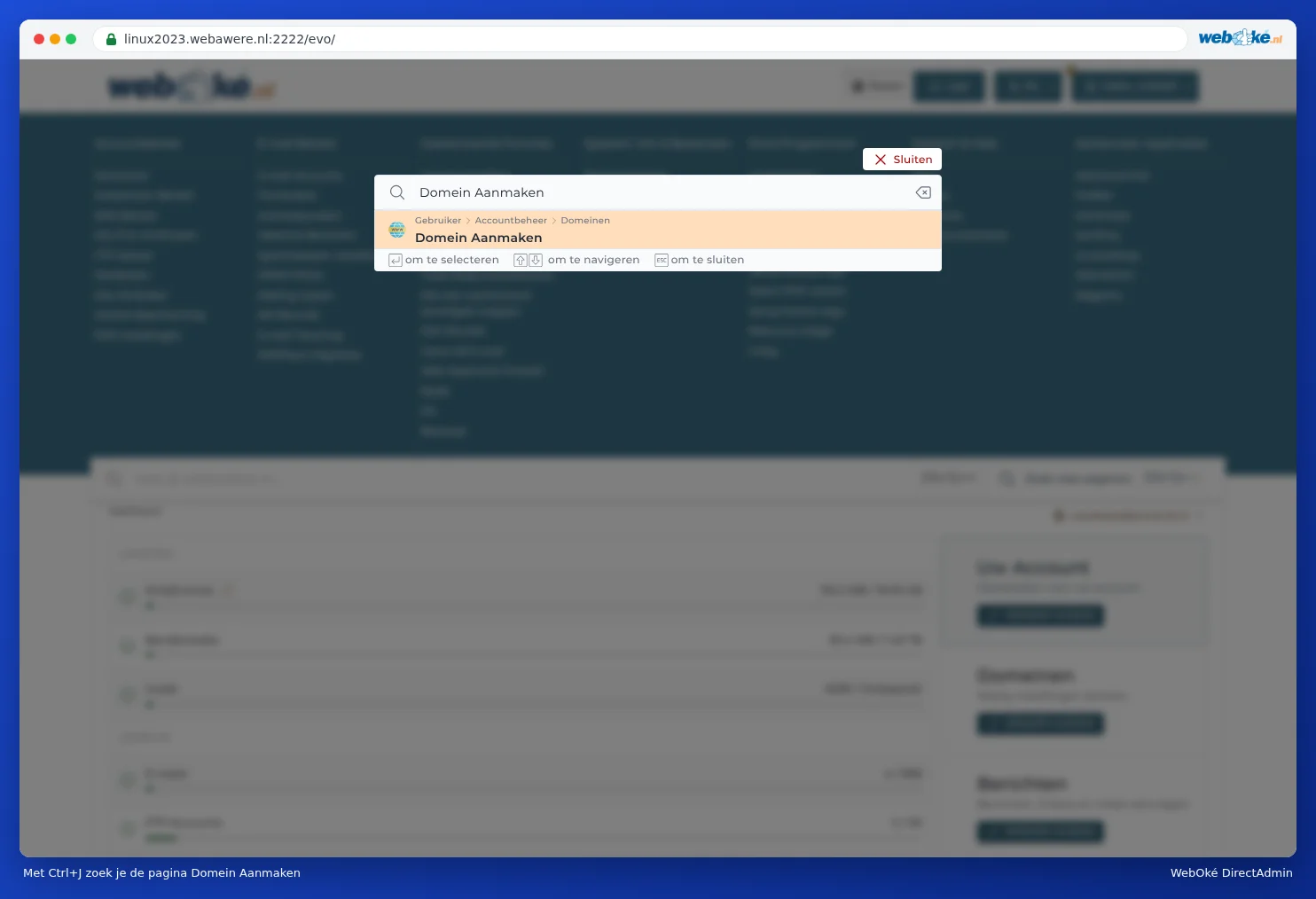
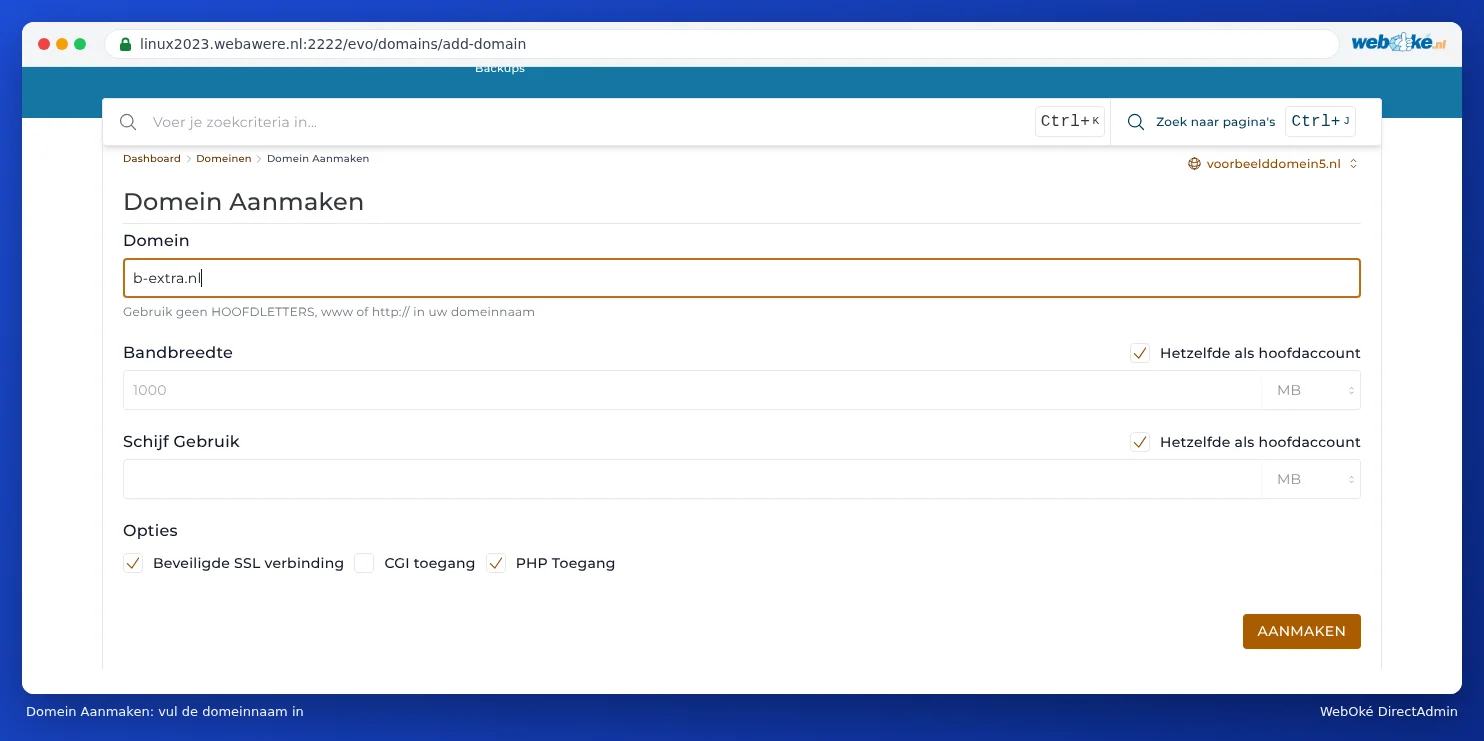
If it's successful, the domain appears in the list under Domains. DirectAdmin immediately creates the folder domains/myshop.com/public_html, along with a DNS zone and the default email settings.
Please note: If your package is full, there's no button on the Domains page to add a domain. If you try anyway, you'll get a message (see below).
The message: You have already reached your allotted limit
Do you get the message Cannot create another domain followed by You have already reached your allotted limit? Then your package already has the maximum number of domains allowed.

You then have two options:
- Increase the number of domains in your package. In My WebOké, go to My Products, click Admin next to the package and increase the Number of domains in the package under Configurable options. Click Save options. You can add the domain once payment has gone through. This isn't possible for some packages; in that case, choose a larger package under Change hosting package.
- Use a domain pointer if the second domain needs to show the same website. Then you don't need an extra domain (see Domain pointers: a second domain name for the same site).
After adding it: point the domain to your package
A domain you add only works once it points to us.
- Is the domain with WebOké? Then it's best to link it via My WebOké (see Can I also do this in My WebOké? Domains per package and Forwarders). This way, the DNS is set up correctly straight away.
- Is the domain with another provider? Set the nameservers there to ns1.webawere.nl and ns2.webawere.nl. If you'd rather keep the DNS with that provider, point the A record there to the IP address of your package instead (see Adding or changing an A or AAAA record and DNS in My WebOké and with external name servers such as Cloudflare).
Then request an SSL certificate for the new domain (see Requesting a free Let's Encrypt certificate).
Frequently asked questions
The counter says I still have room, but I still can't add a domain
Check whether the domain already exists elsewhere on the server, for example in another package or as a pointer. DirectAdmin will then tell you the domain already exists. A domain can only be in one package at a time. Remove it from the other package first, or ask us for help via a ticket.
Can I also create email addresses for an extra domain?
Yes. Each domain in your package has its own email addresses. In E-mail Accounts, choose the right domain at the top right (see Creating an e-mail address).
Can I add more domains to an email package?
No. An email package (such as Email One) includes one domain. If you want email for more domains, take out a separate email package per domain, or choose a web hosting package with more domains.